- October 26 2026
- admin
A viewing goes well on Saturday. The buyer says they like the house and will think it over. By Wednesday nobody has called them back. The negotiator who ran the viewing was out on three more, and the notes are sitting somewhere in their phone.
Nothing dramatic went wrong. A follow-up just slipped, and in property, slipped follow-ups turn into lost instructions and lost offers. That gap is exactly what an estate agent CRM is meant to close.
If you’re wondering whether your agency is ready for one, here’s what a CRM actually does and what to check before you commit.
What is an estate agent CRM?
CRM stands for customer relationship management, which sounds grander than it is. In an agency, it’s the shared record of every buyer, seller, landlord and tenant you speak to, what you told them, and who’s ringing them next.
A portal feed or listings database tells you about properties. A CRM tells you about people: who enquired, who came to a viewing, who’s gone quiet, who’s close to making an offer. Plenty of agencies run both, and some systems, like estate agent software, put the two in one place, so each property sits next to the people asking about it.
Signs your agency needs a CRM
You don’t need a big team to feel this. Watch for these:
- Client details live in spreadsheets, inboxes and personal phones
- Two colleagues contact the same buyer without knowing about each other
- You can’t say, quickly, how many warm leads you have this week
- Follow-ups depend on someone remembering
- A staff member leaves and their contacts and conversations go with them
- Month-end reporting means copying figures from several places
What to look for in an estate agent CRM
Feature lists run long and they all start to sound the same. Here’s what really decides whether people use the thing:
- Enquiries tied to properties. You should see who asked about which listing without hunting through emails.
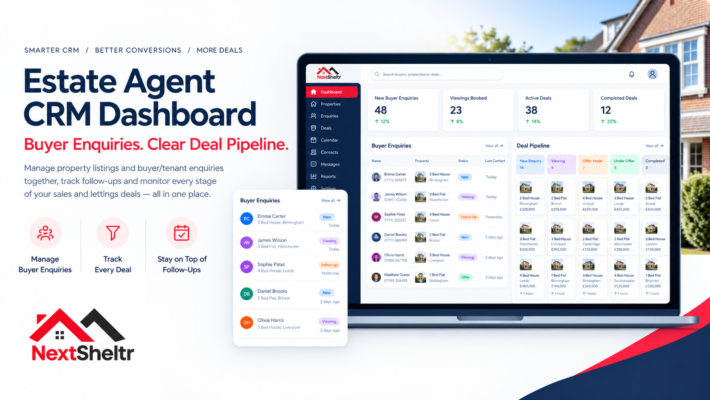
- A clear pipeline. Every sales and lettings deal should show where it stands, from first enquiry to completion.
- Reminders that fire on time. Call-backs, viewings and follow-ups nudge whoever owns them, so nobody has to remember.
- Full contact history. If a colleague takes over a call, they shouldn’t have to ask “what did we say last time?”
- Reporting you will read. Look for simple views of team activity, deal progress and conversions, not a wall of charts.
- Easy daily use. If logging a note is slower than scribbling it on paper, the paper comes back.
- Room to grow. What suits four people today should still cope when you’re fourteen.
- Data protection basics. Ask the vendor how contact data is stored and protected. You’re holding personal information, so UK GDPR applies.
How NextSheltr fits in
NextSheltr is property management software built in London for UK agents, landlords and property managers. For agencies, listings, buyer and tenant enquiries and deal tracking all sit in one place, so whoever answers the phone knows the full story.
It pairs with a real estate agent CRM setup to catch leads and log every interaction, and it plugs into wider property management software if you also look after lettings and landlords. Reminders and reporting come as standard, and it’s built to keep up as your list of properties and clients grows.
Want to see how it would work for your own team? You can get in touch with us.
Getting started without disrupting the office
Most CRM rollouts that fail do so because someone tried to change everything in a week. Go slower:
- Start with contacts. Move your existing contact list in first, whether it’s buyers, vendors, landlords or tenants.
- Agree your pipeline stages. Four or five is plenty: enquiry, viewing, offer, completion.
- Pick one workflow. Enquiry follow-up is the usual place to start, because that’s where leads leak most.
- Set the rule early. Make it a house rule that every call, viewing and note gets logged. Without that, the record can’t be trusted.
- Review after a month. Ask the team what’s getting in their way, then fix it.
The short version
An estate agent CRM won’t close deals for you. It stops enquiries going cold because someone forgot, and it lets anyone in the agency pick up where a colleague left off. Pick one your team finds easy, that shows where every deal stands at a glance, and that won’t struggle when you grow.
FAQs
What is an estate agent CRM?
It’s a shared system for your contacts and every conversation you’ve had with them, plus where each sale or letting stands. Think of it as the replacement for scattered spreadsheets and inbox searches.
Is a CRM different from estate agent software?
They overlap quite a bit. A CRM is built around people and follow-up, whereas estate agent software tends to add listings, viewings and reporting on top. Some platforms, NextSheltr included, do both, so nobody’s flicking between tools.
Do small agencies need an estate agent CRM?
If anything, more than big agencies do. In a small team, one missed call or one person on annual leave can leave leads sitting there. A CRM keeps things moving when everyone’s busy or away.
What should I look at before picking a CRM?
Look at how enquiries link to properties, what the pipeline looks like, whether reminders actually fire, how quick daily entry feels, and how your data is protected. Then ask for a demo that uses your own agency’s workflow, not a canned one.
How quickly can an agency team start using a CRM day to day?
That depends on how big the team is and how tidy your current data is. Most of the effort goes on moving contacts across and agreeing pipeline stages. Begin with one workflow, enquiry follow-up say, and people settle in without much fuss.